Posts

CONTACTS ELECTRIC PAIR (CISA)

Image
Rendering with PhotoView 360 Rendering with Realview  Download 3D model Link

Slow Performance Solidworks

Image
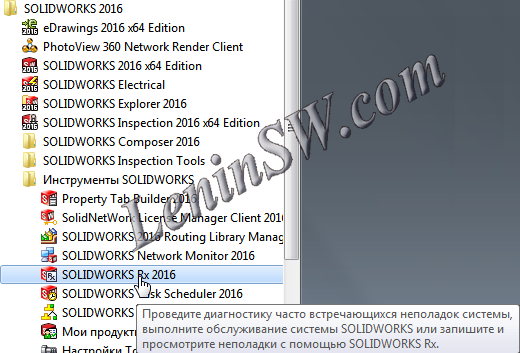
Why is Solidworks slow? Reducing the performance of Solidworks is a very unpleasant situation. And to find the cause is not easy.  Possible reasons: Errors drivers or video cards; Errors of settings or add-ins; Wrong  shortcut to launch; The errors on the disk; Fragmentation of the disk; Data errors in the registry; Power Options; External links. A great help in this is provided by Solidworks Rx . Launch the Solidworks Rx At the bottom of the diagnostic page, there are two safe modes. The choice of the first ignores the video card driver and runs SolidWorks in OpenGL mode for the next SolidWorks session. This can help to eliminate the problem with the video card. If this safe mode resolves the problem, it becomes clear that your problem is related to your card and you need to get a new driver or replace the old video card. Command line of this mode: "C:\Program Files\SOLIDWORKS Corp\SOLIDWORKS\sldworks.exe" /ForceSoftwareOGL /SWDisableExitApp Another safe mode is "Ignore...

SolidWorks Thumbnails Graphics Do Not Display

Image
Sometimes SolidWorks Thumbnails Graphics Do Not Display in Windows Explorer. It was like this To fix this problem you need to make a few mouse clicks: Run Solidworks, go to settings and put a check "Display a smaller copy of the image in Windows Explorer Go to the Windows Control Panel - Folder Options and on the tab "View" remove the tick (if installed) "Always show icons, never thumbnails." Scroll down and put a tick if it is not necessary "Display handlers in preview pane view" Go to the Control click on the "Counters and productivity tools", then "Visual Effects Settings" panel, put a tick "Show thumbnails instead of icons. Check the display of thumbnails if the image does not appear, it is necessary to do a little more action: download files Setting SolidWorks Thumbnails.zip Extract and run the file "Setting SolidWorks Thumbnails.cmd". The batch file does the following: Go to the directory "SolidWorks Sha...

How to Fix SOLIDWORKS Toolbox

Image
Error Solidworks Toolbox: Failed to get writable document Unable to open read-only file Failed to  save Toolbox library: Access to the path is denied Failed to get writable document In this case, you need to check the access rights to the Toolbox directory (by default C: \ Solidworks Data can be viewed in the Toolbox settings) To do this, right-click on the Toolbox-Properties - Security tab. Check that your account has write permissions. Unable to open read-only file With this error, you must tick the "Change the status of the read-only document to the record" in the Toolbox- "User Settings" configurator settings Failed to  save Toolbox library:  Access to the path is denied In the third case, you need to check the write permission of the "ToolboxFiles.index" file, which is located in the Toolbox - \ Browser directory. This error may appear in SW2012 and higher versions. This is due to the fact that starting from Solidworks 2012 the toolbox does not depen...

Running Solidworks in English and Russian (or other) languages using bat / cmd-file

Image
To run Solidworks in English and Russian (or any other localized in Solidworks) languages using the bat-file, we need two additional reg-files that change the language parameters of Solidworks. For example, we will run Solidworks 2016 and launch will do for the Russian and English interface. This can be done for any of the languages that is the localization of Solidworks: (Czech, French, German, Italian, Japanese, Korean, Polish, Portuguese (Brazil), Spanish, Turkish, Russian, English, Chinese Simplified) Listing reg-file (sw_2016_eng.reg) for changing parameters in English Windows Registry Editor Version 5.00 [HKEY_CURRENT_USER\Software\SolidWorks\SOLIDWORKS 2016\General] "Use English language feature names"=dword:00000001 "Use English language"=dword:00000001 The first parameter indicates that you need to use file names and element names in English. The second is to use the menu in English. To automate this process, create a bat-file or cmd-file. Listing the bat-...

The demand for better ways to bring your ideas to life

Image
SOLIDWORKS 2018 includes new features and enhancements that respond directly to user requests and the needs of 21st century product development. Work more efficiently with an improved user interface that takes advantage of your touch-enabled devices, let SOLIDWORKS automatically generate the optimal shape of your design based on functional and manufacturing criteria, or let SOLIDWORKS automatically generate the NC tool paths needed to machine your parts. These capabilities are just some examples of how SOLIDWORKS is changing the way design and manufacturing is done. SOLIDWORKS 2018 Enhancements:User Experience Gets Big Touch Ups SOLIDWORKS 2018 supports a dedicated touch screen mode providing a powerful new set of productivity tools for working on touch screen devices. Freehand sketch with a pen and automatically convert pen strokes to shapes to quickly capture design ideas in the office or on the go.   Take the Guess Work Out of Optimizing Your Designs Automatically optimize the...

SOLIDWORKS 2018 - Overview

Image
Overview Design and Manufacturing Simulation CAM Topology Optimization Easier Assembly Builds Enhanced 3D CAD Interoperability Generate Inspection Reports Faster Powerful Model Based Definition PDM Easier Electronic Design Tolerance Based Machining Free Hand Sketching